JavaScript Linting with JSHint
JSHint is an open source static code analysis tool for detecting errors and compliance with coding rules in JavaScript code. JSHint is a fork of JSLint.
JSHint is available as a Grunt plugin:
grunt-contrib-jshint. To install this plugin, navigate to your project's directory (where
the package.json and
Gruntfile.js files are located) and type
the following command in the terminal
npm install grunt-contrib-jshint --save-dev
The devDependencies field of the
package.json file will now have a new
listing - grunt-contrib-jshint
				  "devDependencies": {
				    "grunt": "~1.0.1",
				    "grunt-contrib-jshint": "^0.12.0"
				  }
We will lint the JS file test.js located
inside the /js directory. Configuration
for this linting task inside the
grunt.initConfig() method follows the
structure given below
				module.exports = function(grunt) {
					grunt.initConfig({
						pkg: grunt.file.readJSON('package.json'),
				        jshint: {
				            files: ['js/test.js']
				        }
					});
				    grunt.loadNpmTasks('grunt-contrib-jshint');
				}
The linting task can now be run typing the command
grunt jshint
Example
Consider the below function, named dice,
containing syntax errors and some lines which are not in compliance
with coding standards (highlighted by arrows)
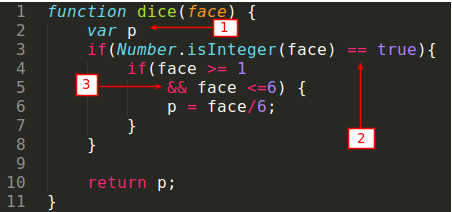
The errors labelled numerically above (in boxes) are described below correspondingly:
- semi-colon after
p -
missing
===operator when comparing against Boolean values -
misleading line break before the logical
&&operator
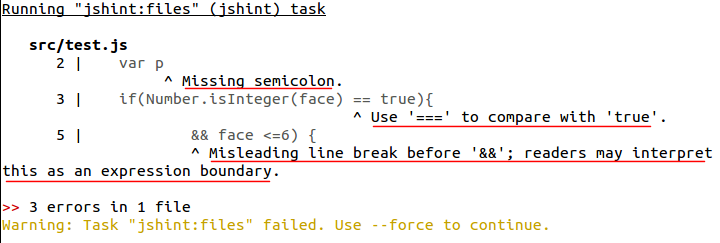
After validating test.js with JSHint, we
get the following result in the console