Jasmine afterEach() Function
The Jasmine
afterEach() function allows you to execute
some code after any spec in the
it() block.
Though generally used to reset/clean up purposes at the end of specs,
here we illustrate with a simple example of incrementing a variable on
call of the afterEach() function after
each spec.
				describe('Value of n', function() {
				  	var n = 0;

				  	afterEach(function(done) {
					    setTimeout(function() {
					      n++;
					      done();
					    }, 1500);
				  	});

				  	it('is 0', function() {
					    expect(n).toEqual(0);
				  	});

				  	it('is 1', function() {
					    expect(n).toEqual(1);
				  	});

				  	it('is 2', function() {
					    expect(n).toEqual(2);
				  	});
				});
The variable n is first initialized to 0.
The afterEach() function after it is
bypassed maidenly to run the first spec - the first
it() block - with the value of
n still at 0, and the test is passed.
After the first spec is executed, the
afterEach() function is invoked, and
n is incremented to 1. So when the
execution moves to the next it() block,
where the expectation for the value of
n is 1, the test is passed again. And the
same happens before the execution of the last
it() block too. The
afterEach() function is invoked again,
n is incremented to 2, and the spec is
passed.
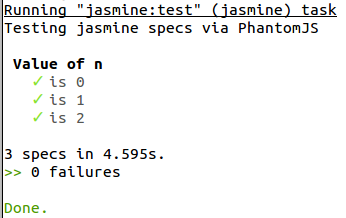
On running the test suite configured in Grunt, the output to the terminal looks like