Add, Remove & Toggle CSS Classes in JavaScript (without jQuery)
In this tutorial, we will learn how to add and remove CSS classes to and from HTML elements in JavaScript, without using jQuery.
Consider a <div> element with
id="rose", which already has two classes:
petal and
leaf.
					<div id="rose" class="petal leaf">
						I'm feeling so Rosy!
					</div>
Add a CSS Class
We will add another class called
thorn to it. To do so in JavaScript, we
need to make use of an element's
classList
read-only property, which returns the
DOMTokenList
of the element.
> document.getElementById('rose').classList;
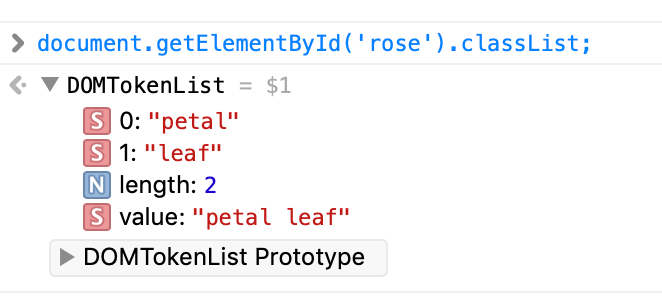
The DOMTokenList interface has two
properties, value and
length. For
classList, the
value property returns a list of class
names as a string and the
length property gives the number of
classes stored in the object.
						> document.getElementById('rose').classList.value; //petal leaf
						> document.getElementById('rose').classList.length; //2
To add one more class to the above
<div> element, we just chain the
add() method to the element's
classList property.
document.getElementById('rose').classList.add('thorn');

There we already have our newly added class
thorn.
						> document.getElementById('rose').classList.value; //petal leaf thorn
						> document.getElementById('rose').classList.length; //3;
If, however, the class name already exists in the
<div> element's
class attribute, the
add() method will ignore it. The
following statement will have no effect, as the class
petal already exists in the
class attribute.
document.getElementById('rose').classList.add('petal');
Remove a CSS Class
Removing a class from an element requires the use of the
remove() method belonging to the
classList property of the element.
To remove the recently added class
thorn from the
<div> element, we just do
document.getElementById('rose').classList.remove('thorn');
Now if you check the value property of
the DOMTokenList interface returned by
classList, you will find that only the
previous two classes — petal and
leaf — remain with it.
document.getElementById('rose').classList.value; //petal leaf
Adding/ Removing Multiple CSS Classes
Both the add() and
remove() methods discussed above can be
used for adding and removing multiple classes at a time.
The below statement adds three classes —
thorn,
bud and
sepal — to the
<div/> element.
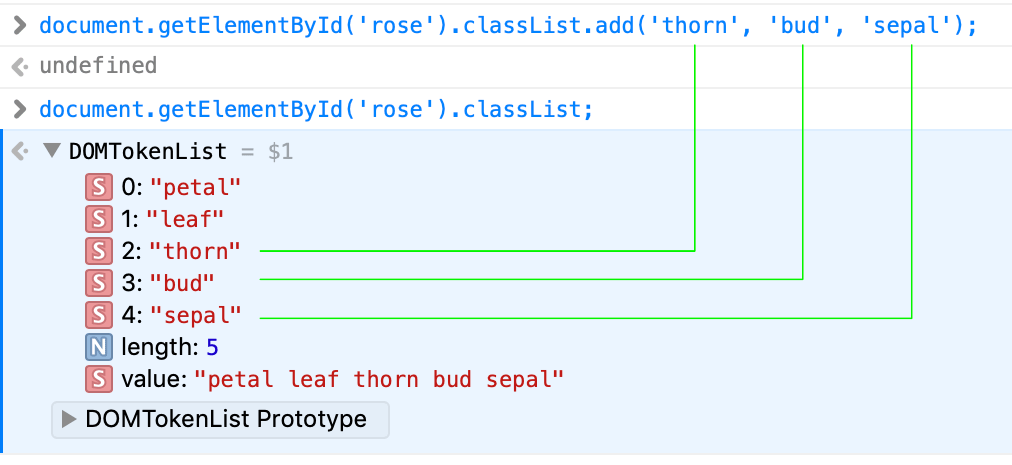
document.getElementById('rose').classList.add('thorn', 'bud', 'sepal');
On checking in the browser's console, we find them in the
DOMTokenList
> document.getElementById('rose').classList;
And the following one removes them all
document.getElementById('rose').classList.remove('thorn', 'bud', 'sepal');
Get a Class
We can get the class at the ith position in the returned collection using the
item() method of the
classList property of an element. The
index starts from 0.
						document.getElementById('rose').classList.item(0); // petal
						document.getElementById('rose').classList.item(1); // leaf
Checking if an Element has a Particular Class with
contains()
An element's classList property has the
contains() method which returns a
Boolean value by checking whether the element has the specified
class, the name of which is passed to it as an argument.
						document.getElementById('rose').classList.contains('petal'); //true
						document.getElementById('rose').classList.contains('stern'); //false
Toggle a Class
Using the above contains() method, we
can now work out a code to toggle between a class name for an
element.
						let rose = document.getElementById('rose').classList;
						rose.contains('thorn')? rose.add('thorn'): rose.remove('thorn');
Often we do such toggle on occurance of some events, like click.
Suppose we have a lone
<button/> element in our example
above. This code toggles the class
thorn for the<div/>
element on click of it.
						let button = document.getElementsByTagName('button');
						button[0].addEventListener('click', () => {
							let rose = document.getElementById('rose').classList;
							!rose.contains('thorn')? rose.add('thorn'): rose.remove('thorn');
						});
JavaScript acutally has a buit-in method for it:
toggle().
						let button = document.getElementsByTagName('button');
						button[0].addEventListener('click', () => {
							document.getElementById('rose').classList.toggle('thorn');
						});