JavaScript: async and
await
async
and
await
are new additions in the ECMAScript 2017 (ES8) specification as a
syntactic sugar on top of JavaScript
Promises. Their usage eases the way to write and read asynchronous functions
besides making their syntax align more with traditional synchronous
JavaScript functions.
The async keyword is placed before a
function f to make it asynchronous, which
then returns a promise.
				async function f() {
					//
				}
We can also denote an async function with
an
ES6 arrow function
notation as
				const f = async () => {
					//
				}
We first consider a simple function
pi() which returns the value of π. To
wrap it along inside a Promise object, we insert the
async keyword as follows:
				const pi = async () => {
					return Math.PI;
				}

				pi().then(res => console.log(res));
Now pi(), despite not being a Promise
object initially, returned a Promise (after using
async ) and the
then() method is chained to it to get the
resolved value.
JavaScript await
The
await
operator delays the async function until
the
Promise
is resolved. Its use, however, is valid only inside the
async function's body.
await can only be used inside an
async function; outside of it, it will
throw a
SyntaxError.
Take a look at the async function below
(it works without assigning async here),
inside of which an instance of the Promise object is invoked without
the await expression.
					const pi = () => {
						return new Promise((resolve,reject) => {
							setTimeout(() => {
								resolve(Math.PI);
							}, 1000);
						});
					}

					const callPi = async () => {
						pi().then(res => console.log(res));
						console.log("PI");
					}

					callPi();
The console.log("PI") statement is after
the pi().then() asynchronous call. But
as the promise is timed to return after 1 second,
console.log("PI") gets printed first,
followed by the value of π after a second.
						PI
						3.141592653589793
We can do away with the
callPi() function replacing it with a
self-invoking function as follows:
					const pi = () => {
						return new Promise((resolve,reject) => {
							setTimeout(() => {
								resolve(Math.PI);
							}, 1000);
						});
					}

					(async () => {
						pi().then(res => console.log(res));
						console.log("PI");
					})();
Now if we assign await before the
instance of the Promise, it delays the execution of the consecutive
console.log("PI") statement till the
Promise object is returned.
					const pi = () => {
						return new Promise((resolve,reject) => {
							setTimeout(() => {
								resolve(Math.PI);
							}, 1000);
						});
					}

					(async () => {
						await pi().then(res => console.log(res));
						console.log("PI");
					})();
The console.log("PI"); statement gets
executed only after the Promise gets resolved/rejected.
						3.141592653589793
						PI
To handle rejected values in the returned Promise, you need to join
the catch() method after
then() as shown below.
					(async () => {
						await pi()
							.then(res => console.log(res))
								.catch(err => console.log(err));
						console.log("PI");
					})();
async/await with the
fetch() Method
We construct another example with the
fetch()
method inside.
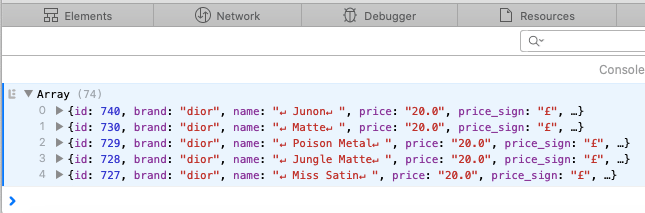
We will retrieve a list of makeup products of some beauty brand using Heroku's Makeup API, say, the brand Dior.
					const makeup = async () => {
					  let response = await fetch('http://makeup-api.herokuapp.com/api/v1/products.json?brand=dior');
					  return await response.json();
					}

					makeup()
					    .then(data => console.log(data))
					    	.catch(err => console.log(err.message));
The details of each item are printed into the browser's console.
Replacing Nested & Chained Promises w/
async &await
There often arise a case when the condition to make a subsequent promise call depends upon the result of the first request. For example, take the following scenario:
-
A biker logs in with his email and password into a garage website.
A
fetch()call is initiated. -
A promise is returned, which contains his user id. This user id is
used to fetch his other details to display in the dashboard,
including his last servicing id. This is another
fetch()call after the first promise's return. -
Now the returned servicing id is passed into another
fetch()call to retrieve the servicing details.
Already you might have a scanty picture in your mind that this implemention requires nested asynchronous calls. This is one simple example where a subsequent asynchronous call depends upon the data of the preceding request. You cannot make the second call without the result of the first.
We will illustrate it with an example. Using Heroku's Makeup API, we will retrieve all the available makeup items from Dior, Maybelline and Revlon. Though (for the sake of simplicity) we do not involve any dependencies on the datas returned by promises here, the retrieval process goes like this: fetch Dior products first, then Maybelline, then Revlon.

After the last fetch() call, all the
results returned by promises are resolved into a single JavaScript
object.
					const fetchDetails = (url) => {
					  return fetch(url).then(res => res.json());
					}

					const makeup = () => {
						return new Promise(resolve => {
						  fetchDetails('http://makeup-api.herokuapp.com/api/v1/products.json?brand=dior').then((dior) => {
						  	fetchDetails('http://makeup-api.herokuapp.com/api/v1/products.json?brand=maybelline').then((maybelline) => {
						  		fetchDetails('http://makeup-api.herokuapp.com/api/v1/products.json?brand=revlon').then((revlon) => {
						  			resolve({
									  	'dior': dior,
									  	'maybelline': maybelline,
									  	'revlon': revlon,
									  	'total': dior.length + maybelline.length + revlon.length
									  });
						  		});
						  	})
						  });
						});
					}

					makeup().then(res => {
						console.log(res);
					});
Here is the output in the browser's console.
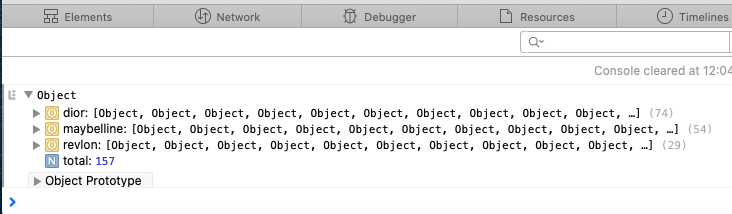
As long as we have only such few fetches, nested asynchronous calls look fine. But what if we have to fetch from over a 100 brands? The nesting would extend forever. This is when we enter the "Pyramid of Doom", also known as "Callback Hell". Forget the clutter, the code would be unmanageable!
This is where chaining promises comes in, offering a neater break from deep nesting. We attach the callbacks to the returned promises. The result is the same.
					const fetchDetails = (url) => {
					  return fetch(url).then(res => res.json());
					}

					const makeup = () => {
						let dior = maybelline = revlon = [];

						return new Promise(resolve => {
						  fetchDetails('http://makeup-api.herokuapp.com/api/v1/products.json?brand=dior')
						    .then(res => dior = res)
						  	.then(res => fetchDetails('http://makeup-api.herokuapp.com/api/v1/products.json?brand=maybelline'))
						  	.then(res => maybelline = res)
						  	.then(res => fetchDetails('http://makeup-api.herokuapp.com/api/v1/products.json?brand=revlon'))
						  	.then(res => {
						  		revlon = res;
					  			resolve({
								  	'dior': dior,
								  	'maybelline': maybelline,
								  	'revlon': revlon,
								  	'total': dior.length + maybelline.length + revlon.length
								  });
					  		});
					  	});

					}

					makeup().then(res => {
						console.log(res);
					});
And better still, we can do away with the nestings and the chainings
using async and
await. Here is an example showing how
they are implemented. The items of Dior are fetched first, then
Maybelline's, then Revlon's.
					const fetchDetails = (url) => {
					  return fetch(url).then(res => res.json());
					}

					const makeup = async () => {
					  const dior = await fetchDetails('http://makeup-api.herokuapp.com/api/v1/products.json?brand=dior');
					  const maybelline = await fetchDetails('http://makeup-api.herokuapp.com/api/v1/products.json?brand=maybelline');
					  const revlon = await fetchDetails('http://makeup-api.herokuapp.com/api/v1/products.json?brand=revlon');

					  return {
					  	'dior': dior,
					  	'maybelline': maybelline,
					  	'revlon': revlon,
					  	'total': dior.length + maybelline.length + revlon.length
					  };
					}

					makeup().then(res => {
						console.log(res);
					});