JavaScript call(),
apply() and
bind() Methods.
There is a provision in JavaScript where we can use methods belonging
to some function/object on another, without copying or redefining them
again. This is what method "borrowing" is all about, and we have the
call(),
apply() and
bind() methods for it, all belonging to
the Function.prototype property.
call() or
Function.prototype.call()
 Zebra Swallowtail
by Meganmccarty , via Wikimedia Commons. Public Domain.
Calendulauda Albescens
by Andrew Smith, via Wikimedia Commons. Public Domain.
Zebra Swallowtail
by Meganmccarty , via Wikimedia Commons. Public Domain.
Calendulauda Albescens
by Andrew Smith, via Wikimedia Commons. Public Domain.
The
call()
method belong to the
Function.protoype property and was first
introduced in
ECMAScript 3
(15.3.4.4, p.96). The call() method
invokes a function with a given
this value (which is an object) while
the arguments are provided to it individually. The syntax is as
follows
function.call(this, argument1, argument2, ... , argumentN)
this
this provided for the call to
function.
argument1, ..., argumentN
function.
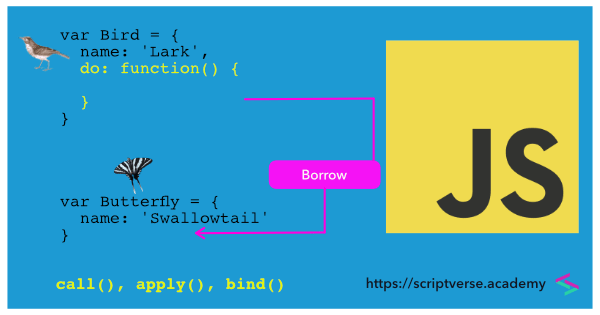
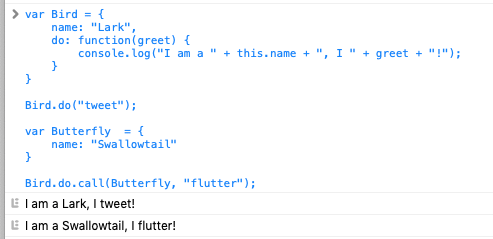
In this script, the object Butterfly do
not have the do() method, which belong
to the Bird object. But it borrows the
method from the Bird object via
call(). The
this object provided for the call is the
Butterfly object and the argument
"flutter" after it is an argument to the actual method
Bird.do().
					var Bird = {
					    name: "Lark",
					    do: function(greet) {
							console.log("I am a " + this.name + ", I " + greet + "!");
					    }
					}

					Bird.do("tweet");

					var Butterfly  = {
					    name: "Swallowtail"
					}

					Bird.do.call(Butterfly, "flutter");
Here is another example.
 Wizard of Oz. Public Domain
Here, the this object is the
title object and the remaining arguments
after the this object are arguments to
the actual function movie().
					var title = {name: "Wizard of Oz"};

					function movie(year, length) {
					    return "Movie: " + this.name + ", Year: " + year + ", Length: " + length;
					};

					console.log(movie.call(title, '1939', '101 mins'));
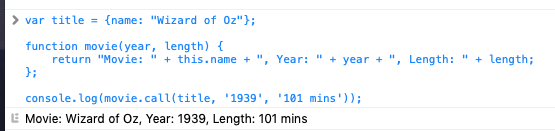
Executing the script in the browser's console, we get
apply() or
Function.prototype.apply()
The
apply()
method also belong to the
Function.protoype property and is
similar in syntax to the call() method.
The difference is, while the
call() method accepts arguments as a
list, the apply() method accepts them as
an array. The syntax is as follows
function.apply(this, [argument1, argument2, ... , argumentN])
this
this provided for the call to
function.
[argument1, ..., argumentN]
function.
It was also introduced in ECMAScript 3 (15.3.4.3, p.95).
The apply() method invokes a function
with a given this value (which is an
object), while the arguments args are
provided to it as an array.
					var title = {name: "Wizard of Oz"};
					var args = ['1939', '101 mins'];

					var movie = function(year, length) {
					    return "Movie: " + this.name + ", Year: " + year + ", Length: " + length;
					};

					console.log(movie.apply(title, args));
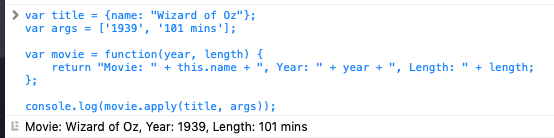
NOTE: The call() and
apply() methods look syntatically
identical, but there is a difference in the way they accept arguments.
call() accepts a list of arguments, while
apply() accepts a one-dimensional array of
arguments.
bind() or
Function.prototype.bind()
The
bind()
method was introduced in the
ECMAScript 5
specificaton (15.3.4.5, p.119). Like the
call() and
apply() methods, it also belong to the
Function.prototype property.
The bind() method creates a bound
function, which is a kind-of wrapper for the original function. This
returned function can then be stored for later use.
In the script below, the bound function is assigned to the
binded variable, which is invoked a line
below, inside the console.log() method.
The arguments '1939' and
'101 mins' are already
prepended to the argument list when the bound function
binded() is called.
					var title = {name: "Wizard of Oz"};

					var movie = function(year, length) {
					    return "Item: " + this.name + ", Year: " + year + ", Length: " + length;
					};

					var binded = movie.bind(title, '1939', '101 mins');

					console.log(binded());
We can also create a bound function without any prepended arguments, and pass them at the time of invoking it.
					var title = {name: "Wizard of Oz"};

					var movie = function(year, length) {
					    return "Item: " + this.name + ", Year: " + year + ", Length: " + length;
					};

					var binded = movie.bind(title);

					console.log(binded('1939', '101 mins'));
Now there is a common mistake while extracting a method from an
object. Here, number.getN is extracted
and assigned to retrieveN. When
retrieveN is called, it is a common
perception that it uses the original
number object, but instead, it calls the
window object as this. So that when
retrieveN is called, it refers to
window.n (or
this.n) of the window object and returns
2, and not the original object number.
					this.n = 2;    // 'this' refers to global window object
					var number = {
					  n: 3,
					  getN: function() { return this.n; }
					};

					number.getN(); // 3

					var retrieveN = number.getN;
					retrieveN(); // returns 2; not 3
The
this
keyword refers to the context object in which the current code is
executing. If it is in the global context, it will refer to the
browser's window object, unless the
'strict mode' is applied.
You can try the following script quickly in your browser console,
and it will return true.
> Object(window, this);
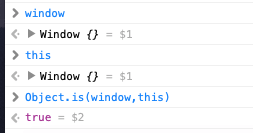
So when we declare x as a global
variable, both window.x and
this.x returns the same value.
					> var x = 3;
					> window.x
					> this.x
This can be remedied by creating a bound function using the
bind() method.
					this.n = 2;    // 'this' refers to global window object
					var number = {
					  n: 3,
					  getN: function() { return this.n; }
					};

					var boundGetN = number.getN.bind(number);
					boundGetN(); // returns 3