Load/Render a simple HTML, CSS, JS website in Node.js
In our previous tutorial, we have learned how to build a basic Node.js server to serve simple HTML files. In this tutorial, we will learn how to serve all three files that constitute a basic static website — HTML, CSS and JS files — by making use of Node.js's built-in http and fs modules.
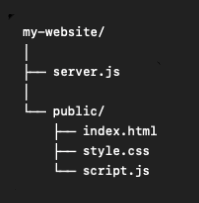
We create a simple folder structure as below. The server file server.js is at the root folder, and the rest HTML, CSS, JS files are inside the /public folder.
Our index.html file is a simple file which look like below:
						// public/index.html
						<!DOCTYPE html>
						<html>
						<head>
						<title>Hello!</title>
						<link rel="stylesheet" href="style.css">
						</head>

						<body>
						<h1>Hello!</h1>
						<p>I'm an HTML file served by Node.js.</p>
						<button onclick="sayFoo()">Click Here</button>
						<script src="script.js"></script>
						</body>
						</html>
The style.css file does the simple styling.
						// public/style.css
						body {
							font-family: monospace;
							text-align: center;
							margin-top: 100px;
						}

						h1 {
							color: blueviolet;
						}

						button {
							padding: 10px 20px;
							cursor: pointer;
						}
And a simple JavaScript file script.js to add some interativity.
						// public/script.js
						function sayFoo() {
							alert("Foo!");
						}
The Node.js Server
The below Node.js HTTP server serves all three files from the /public directory.
							const http = require("http");
							const fs = require("fs");
							const path = require("path");

							const server = http.createServer((req, res) => {
								let filePath;

								if (req.url === "/") {
									filePath = path.join(__dirname, "public", "index.html");
								} else {
									filePath = path.join(__dirname, "public", req.url);
								}

								fs.readFile(filePath, (error, data) => {
									if (error) {
										res.writeHead(404, {
											"Content-Type": "text/plain"
										});
										res.end("404 - File Not Found");
										return;
									}

									const extension = path.extname(filePath);
									let contentType = "text/plain";

									if (extension === ".html") {
										contentType = "text/html";
									} else if (extension === ".css") {
										contentType = "text/css";
									} else if (extension === ".js") {
										contentType = "text/javascript";
									}

									res.writeHead(200, {
										"Content-Type": contentType
									});

									res.end(data);
								});
							});

							server.listen(3000, () => {
								console.log("Server running at http://localhost:3000");
							});
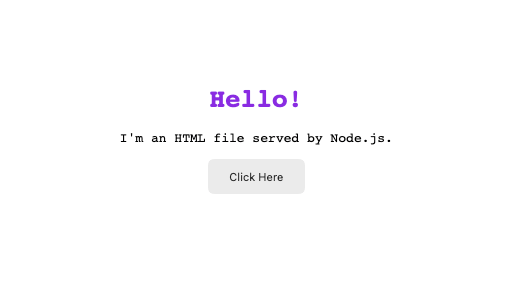
And finally, the HTML file, along with the CSS & JS files, are rendered.
This is an essential simple static web server, a first step before learning frameworks like Express.js and Nest.js.