React/ReactJS: The JSX
In our previous tutorial, we
have created a boilerplate ReactJS application using the
create-react-app
command line (CL) tool.
Find the index.js file inside the
/src directory and you will find the below
line of code.
ReactDOM.render(<App/>, document.getElementById('root'));

As can be seen, there are two arguments passed to the
ReactDOM.render() function. The first
argument <App/> is known as the
component. We will learn more about them in our
next tutorial here. The
second argument is an element with
id="root" inside
public/index.html where the JSX will be
finally rendered.
<div id="root"><div/>
Let us replace the <App/> component
with <h1>Hello, World!</h1> as
an argument to ReactDOM.render().
ReactDOM.render(<h1>Hello, World!</h1>, document.getElementById('root'));
Now this
<h1>Hello, World!</h1> piece
of code we just passed into
ReactDOM.render() looks a lot like HTML,
but it is not; it is JSX. The JSX is a syntax extension to
JavaScript akin to XML. But JSX is actually closer to JavaScript than
any mark-up language. What happens from here, we will describe it in
the next paragraph below.
In ReactJS , the
whole JSX is compiled into
React.createElement() function calls by
Babel, which in turn
outputs an object to be rendered by
ReactDOM.render() into the real DOM. This
can be summarized into three steps as follows —
-
Babel compiles your JSX into
React.createElement()function calls. -
The
React.createElement()function call returns an object, known as React Element. -
The returned object is then passed into
ReactDOM.render()which renders it into the targeted element in the DOM.
Now let us illustrate the above steps with an example. Let us consider
adding a class called hello to our JSX tag
<h1>. Before we procced any further,
we note that in JSX all attributes and properties are written in
camelCase, except the aria-* and
data-* attributes. So when you have to add
the class attribute to the
<h1> element, the usual HTML syntax
<h1 class="hello"> will not work;
you will have to use className.
ReactDOM.render(<h1 className="hello">Hello, World!</h1>, document.getElementById('root'));
The Babel compiler
transforms the JSX into nested
React.createElement() function calls.
				React.createElement(
				  "h1",
				  { className: "hello" },
				  "Hello, World!"
				);
To see how your JSXes are converted in Babel's online compiler, try them out here.
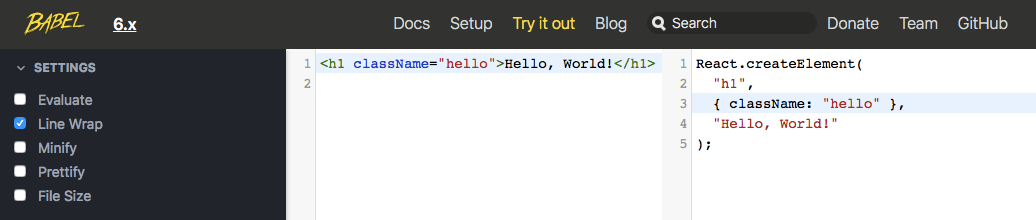 JSX transformation in Babel
The React.createElement() function then
creates a JavaScript object, which we can check by doing
console.log() of what the Babel compiler
returned.
console.log(React.createElement("h1", { className: "hello" }, "Hello, World!"));
The object contains the following properties —
key, props,
ref, type.
This object is known as the React Element.
				{
					key: null,
					props: {
						children:"Hello, World!"
						className:"hello"
					},
					ref: null,
					type: "h1"
				}
JavaScript Expressions in JSX
We can substitute valid JavaScript expressions in JSX inside curly braces. For example, the below expression adds two numbers, 1 and 2, giving the result 3.
ReactDOM.render(<p>{1+2}</p>, document.getElementById('root'));
An expression can also be a user-defined string
					const name = "Agnes";
					ReactDOM.render(<p>Hello, {name}</p>, document.getElementById('root'));
or just some pre-defined constant.
ReactDOM.render(<p>{Math.PI}</p>, document.getElementById('root'));
It can also be conditional, assuming any of the two given values, based on the given condition.
ReactDOM.render(<p>{1 === 1?'Yes':'No'}</p>, document.getElementById('root'));
camelCased Attributes
With the exception of aria-* and
data-*, all properties and attributes in
JSX are camelCased. In one of our above examples, we have used
className instead of
class. The pattern is the same for the
rest. For example, the
maxlength attribute of the
<input/> HTML element becomes
maxLength in the JSX, the
colspan attribute becomes
colSpan. It is the same for events also;
with JSX, we use onClick,
onMouseOver,
onKeyPress,
onBlur, etc.
Children
JSX may contain nested tags as in below, where
<span> is a child tag of
<h1>.
ReactDOM.render(<h1>Hello, <span>Agnes!</span></h1>, document.getElementById('root'));