Event Attributes, Event Handlers & Event Listeners
DOM elements, along with certain objects like the
document object, the
window object and the
XMLHttpRequest object, possess a set of
attributes, properties and methods to implement desired behaviour on
occurence of DOM events.
Consider a <button> element in the
document
<button>Click</button>
and declare a function called hello() that
alerts the message Hello! when
called/invoked
				function hello() {
					alert("Hello!");
				}
1. Event Attributes
There are a set of attributes prefixed by "on" to the name of an
event that can be used on HTML elements to execute scripts on
trigger of events. They are known as
event attributes.
onclick,
onload,
onmouseover,
onfocus, etc are some examples of
commonly used event attributes. Below we add the
onclick event attribute to the
<button> element as shown below
<button onclick='hello()'>Click</button>
The function hello() gets executed
whenever the <button> element is
clicked.
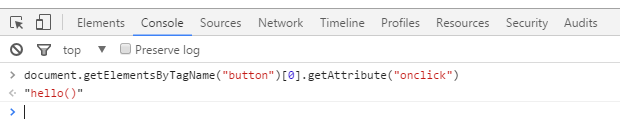
To confirm that the onclick event has
been added as an attribute to the
<button> element, get the
onclick attribute by typing the
following line into the console
document.getElementsByTagName("button")[0].getAttribute("onclick");
and you will get the output as "hello()"
The use of event attributes however is not a recommended method anymore as Content Security Policy (CSP) implementation can block inline scripts.
2. Event Handlers
Adding an event attribute to an element creates a
corresponding property. In the above section, adding the
onclick event attribute to the
<button> element has also created
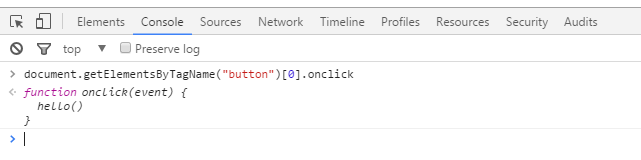
the corresponding onclick property. To
see what I mean, type the below line of code into the browser
console
document.getElementsByTagName("button")[0].onclick
You will find that the onclick property
has been assigned the hello() function
already
Now akin to event attributes, these properties also reacts to
events, to each of which a function can be assigned. These
properties are known as event handlers.
A function assigned to an event handler is executed on occurrence of
that event. Below we assign the existing
hello() function to the
onclick property of the
<button> element
document.getElementsByTagName("button")[0].onclick = hello;
We can also use an anonymous function in place of the
hello() function as
document.getElementsByTagName("button")[0].onclick = function(){alert("Hello!");};
Besides DOM elements, event handlers can also be used on objects
like window,
document,
XMLHttpRequest, etc. For example, the
onresize event handler is attached to
the window object as
window.onresize = function(){};
But as in the case of event attributes, setting a
property does not create the corresponding attribute. So if the
onclick='hello()' attribute-value pair
has been removed from the
<button> element, setting the
onclick property as
document.getElementsByTagName("button")[0].onclick = hello;
will not get us back the removed
onclick='hello()' attribute-value pair.
3. Event Listeners
An event can also be registered to the target element using the
addEventListener() method. It has the
following syntax
addEventListener(event, function, useCapture);
The event parameter, as the name itself
suggests, is the name of the event that is registered to the
targeted element. The function parameter
refers to the function to be called when the event occurs. The
useCapture parameter takes a Boolean
value according to the event being propagated is bubbled (false) or captured (true).
In the example below, we make use of the
addEventListener() function to register
the click event to the
<button> element, passing the
click event as the first parameter, the
existing hello() function as the second
parameter, and false as the third
parameter, setting the event for bubbling
document.getElementsByTagName("button")[0].addEventListenner('click', hello, false);
And as shown in the above sections, we can also use an anonymous
function in place of the existing
hello() function
document.getElementsByTagName("button")[0].addEventListenner('click', function(){
	alert("Hello!");
}, false);