Clusters in Node.js
To illustrate the workings of a cluster module in Node.js, we consider loading two HTTP pages. The first is a very simple page which loads very fast, and the second involves executing a synchronous iterative math function which delays the page load.
The math function we consider executing in the second page is generating an $n^{th}$ term of a Padovan Sequence, which is named after the British architect Richard Padovan. The sequence is given by the following recurrence relation:
$P(0) = P(1) = P(2) = 1,$
$P(n) = P(n-2) + P(n-3), \text{for} \ n >= 3$
The terms of the Padovan sequence are given by
1, 1, 1, 2, 2, 3, 4, 5, 7, 9, 12, 16, 21, 28, 37, 49, 65, 86, 114, 151, 200, 265, ...
We write an iterative function below to compute the $n^{th}$ term of the sequence, and it takes quite a time to compute for higher values of $n$. For example, it could take upto 6 seconds to compute the $75^{th}$ term. We export this function as a module.
						// padovan.js
						function padovan(n) {
							if (n <= 2) return 1;
							return padovan(n - 2) + padovan(n - 3);
						}

						module.exports = { padovan };
Now we write a simple server with two routes: "/" and "/padovan". The page with route "/padovan" loads the function inside the padovan.js module.
						// server.js
						const http = require("http");
						const PORT = 3000;

						const server = http.createServer();
						const { padovan } = require("./padovan.js");

						server.on("request", (req, res) => {
							if (req.url === "/") {
								res.writeHead(200, { "Content-Type": "text/plain" });
								res.end(`Fast Page! (PID: ${process.pid})\n`);
							} else if (req.url === "/padovan") {
								res.writeHead(200, { "Content-Type": "text/plain" });
								res.end(`Padovan(75) = ${padovan(75)} (PID: ${process.pid})\n`);
							}
						});

						server.listen(PORT, () => {
							console.log(`Server runs with PID ${process.pid} on PORT :${PORT}`);
						});
Run the program. Open the urls http://localhost:3000 and http://localhost:3000/padovan in the browser and inspect and click the Network tabs. Now refresh the URLs; first, http://localhost:3000 and then http://localhost:3000/padovan in order. Check the loading times. The first would take only about 3-5ms but the second one would take about 6s. This is obvious because of the padovan() function execution in the second.
Now reverse the refresh order. Refresh http://localhost:3000/padovan first and then http://localhost:3000/. You will see that now it takes significant amount of time to load the second url http://localhost:3000/. This is because of the single-threaded nature of Node.js running on a single-core. It won't load the page under http://localhost:3000/ before it finishes loading the page under http://localhost:3000/padovan.
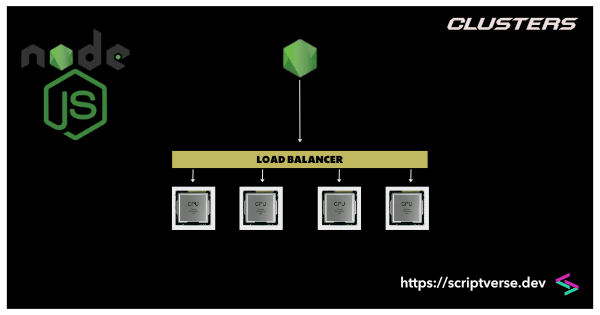
We can assign loading the second HTTP request to a separate process to run parallely using clusters. Clusters allow the creation of multiple processes (workers), each running on a separate CPU core, sharing the same server port, distributing the workload across them.
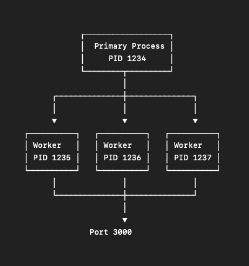
The code above is restructured to make use of clusters. The main thread runs inside the isPrimary block, where we spawned two clusters with the two statements cluster.fork(). These two newly created clusters run inside the else block (you can console log isWorker to check it).
						const http = require("http");
						const cluster = require("cluster");
						const { isPrimary } = cluster;
						const PORT = 3000;
						const { padovan } = require("./padovan.js");

						if (isPrimary) {
							console.log(`Master process running with PID: ${process.pid}`);
							cluster.fork();
							cluster.fork();
							cluster.on("exit", (worker, code, signal) => {
								cluster.fork();
							});

						} else {
							const server = http.createServer();
							server.on("request", (req, res) => {
								if (req.url === "/") {
									res.writeHead(200, { "Content-Type": "text/plain" });
									res.end(`Fast Page! (PID: ${process.pid})\n`);
								} else if (req.url === "/padovan") {
									res.writeHead(200, { "Content-Type": "text/plain" });
									res.end(`Padovan(75) = ${padovan(75)} (PID: ${process.pid})\n`);
								}
							});

							server.listen(PORT, () => {
								console.log(`Server runs with PID ${process.pid} on PORT :${PORT}`);
							});
						}
Run the program. Now open both the urls in the browser in reverse order: first open http://localhost:3000/padovan and then http://localhost:3000/. You will find that there is no delay now to load the page under the second url, the home page loads fast. That is because now two separate cores has been created and the load balancer distributes the incoming HTTP traffic sequentially (round-robin) across multiple cores evenly, in a rotating circular manner. Note that the round-robin method does not make intelligent decisions, it merely distributes.
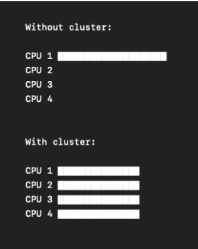
There is, however, a great chance of loading these two tasks under a single created core on repeated refresh; separate HTTP requests hitting a single worker process. If so, you will observe the same delay as before under single-core process despite creating different clusters and the PID numbers will show the same.
In the above example, we have created just two clusters. You can maximize the server's potential effectively by forking clusters upto the allowed number. The method os.availableParallelism() gives the estimate of the default number of CPU cores available for allocation. This was introduced as a safer alternative to os.cpus().length.
						for (let i = 0; i < os.availableParallelism(); i++) {
							cluster.fork();
						}