Handling a CPU-intensive Task in Node.js: Using a Worker Thread
In this tutorial, we explore Node.js Worker Threads through an example.
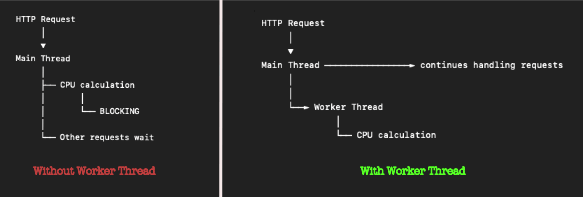
The for loop in the below code iterates a billion times. It first prints "A", takes sometime to print "B" and then immediately prints "C". In a way, the for loop here is blocking. It blocked the execution of the last statement console.log("C"); till the for loop is done.
						const n = 1e9;

						console.log("A");

						for (let i = 0; i < n; i++) {
							if (i === n-1) {
								console.log("B");
							}
						}

						console.log("C");
We take another example, generating the $n^{th}$ term of a Padovan Sequence (named after Richard Padovan, a British architect). The sequence is defined by the below recurrence relation:
$P(0) = P(1) = P(2) = 1,$
$P(n) = P(n-2) + P(n-3), \text{for} \ n >= 3$
And the values of the first few terms of the sequence are
1, 1, 1, 2, 2, 3, 4, 5, 7, 9, 12, 16, 21, 28, 37, 49, 65, 86, 114, 151, 200, 265, ...
We write a recursive function to find the $75^{th}$ term of the sequence.
						console.log("A");

						function padovan(n) {
							if (n < 2) return 1;
							return padovan(n - 2) + padovan(n - 3);
						}
						console.log(padovan(75));

						console.log("C");
The program prints "A" very fast. It then waits for sometime to compute and print the $75^{th}$ padovan sequence — the number 1042002567 — which is a CPU-intensive, and then immediately prints "C".
						A
						1042002567
						C
The above two programs are classic examples of a long-running and a CPU-rigorous tasks in Node.js, which Node is just NOT good at. Several tasks like image manipulation, data processing, complex encryption are also examples of CPU-intensive tasks. Node.js is supposed to be a non-blocking I/O asynchronous single-threaded programming language. And here we face a limitation. The main thread has been delayed by a long-running iterative code.
To keep the main thread running without getting blocked, we need to offload such CPU intense tasks elsewhere. We make use of the Worker (thread) to off load the Padovan Sequence computation to a new thread. Worker threads allow you to create multiple threads within the same single process.
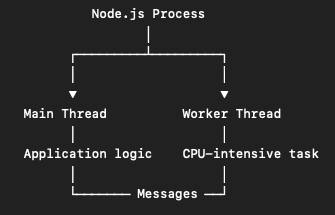
We create a separate file padovan-worker.js where the actual CPU-bound task is performed.
						const { parentPort, workerData } = require("worker_threads");

						function padovan(n) {
							if (n < 2) return 1;
							return padovan(n - 2) + padovan(n - 3);
						}

						const result = padovan(workerData.n);
						parentPort.postMessage(result);
We first import the native worker_threads module, its Worker class, the isMainThread boolean property and parentPort, which is an instance of the MessagePort in worker_threads. A new instance of the Worker class is created passing the external padovan-worker.js file as an argument, creating a new thread. The code in the padovan-worker.js file gets executed in this newly created thread on a separate CPU core. This worker thread gets its own instance of the V8 engine and its own Event Loop.
						const { Worker, isMainThread } = require("worker_threads");

						console.log("A");

						if (isMainThread) {
							const worker = new Worker("./padovan-worker.js", {
								workerData: { n: 75 },
							});

							worker.on("message", (number) => {
								console.log(`Padovan Number: ${number}`);
							});

							worker.on("error", (err) => {
								console.log(err);
							});
						}

						console.log("C");
After this, the .on('message', ...) event listener is attached to the instance, which listens to the 'message' event emitted by parentPort.postMessage() inside the padovan-worker.js file. After the $75^{th}$ sequence is computed in padovan-worker.js, the CPU-intensive computed number (1042002567) is sent. The event listener picks the message and passes it as a parameter to the method’s callback, which prints it to the console.
						A
						C
						Padovan Number: 1042002567
Wrapping with Promises
As the node:worker_threads module is built on top of JavaScript's EventEmitters, you do not need to use Promises here. Communication between the main thread and worker threads happens via the events .on('message'), .on('error'), not Promises. However, wrapping workers inside a Promise is a highly recommended industry practice as the usage of async/await gives cleaner, non-blocking asynchronous code workflows.
							const { Worker } = require("worker_threads");

							console.log("A");

							const runPadovanAsync = () => {
								return new Promise((resolve, reject) => {
									const worker = new Worker("./padovan-worker.js", {
										workerData: { n: 75 },
									});
									worker.on("message", resolve);
									worker.on("error", reject);
								});
							};

							(async () => {
								try {
									const result = await runPadovanAsync({ n: 75 });
									console.log(result);
								} catch (error) {
									console.error(error);
								}
							})();

							console.log("C");