React/ReactJS: Change Port Number
By default, a ReactJS app created by
create-react-app tool runs on port
3000. Now an Express.js app also runs on
the same port 3000. If you were to run the
two apps simultaneously, there would be conflicts. You need to change
the port of one of them.
In ReactJS, the easiest way to alter the port number is by setting an
environment variable named PORT to the
desired number via the terminal. As an example, here we change the
port number to 5000.
In Linux and Mac terminals, it would be
$export PORT=5000
In Windows, the command is slightly different
$env:PORT=5000
Next if you run
npm start
your local server will run on port 5000.

Modifying package.json
If your app is created via
npx create-react-app, you will find the scripts property in
your package.json file.
						  "scripts": {
						    "start": "react-scripts start",
						    "build": "react-scripts build",
						    "test": "react-scripts test --env=jsdom",
						    "eject": "react-scripts eject"
						  }
It has the start key and its value needs
to be prepended with PORT=N, where
N is the assigned port number. If you
wish to run your React app on port number
2000, modify your
package.json file as follows:
						  "scripts": {
						    "start": "PORT=2000 react-scripts start",
						    "build": "react-scripts build",
						    "test": "react-scripts test --env=jsdom",
						    "eject": "react-scripts eject"
						  }
Now if you run npm start, the app will
start on port 2000.
http://localhost:2000
Setting via .env
Port number can also be set as an
environment variable. Create an .env file in the root
directory of your project, i.e., in the same directory where the
files .gitignore,
package.json and
README.md are located.
Environment variables declared in the
.env file are consumed in ReactJS as any
local variable. An environment variable is defined on
process.env. If you define an
environment variable named IMG_PATH, it
will be available in your component as
process.env.IMG_PATH.
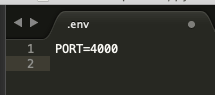
If you need the app to run on some port, assign an environment
variable named PORT to the desired port
number. Here, the port is assigned to the number 4000.
PORT=4000
Save the .env file and do
npm start
The app will run on port 4000.

Now if your ReactJS application is configured via the
Vite
build tool, it'll run on port
5173 by default. This port number hardly
requires any change as "the number was chosen because it visually
resembles the word "VITE" (5=V, 1=I, 7=T, 3=E)" and likely no
popular web programming language in the vicinity uses that port
number. But should you fancy or require a change, you can append the
port number in the vite.config.js file
as:
							import { defineConfig } from 'vite';
							import react from '@vitejs/plugin-react';

							export default defineConfig({
								plugins: [react()],
								server: {
									port: 3000, // your desired port number
								},
							})
Or you can configure in your
package.json file as follows:
              "scripts": {
                "dev": "vite --port 3000"
              }