React/ReactJS: useState v/s useReducer
useState
is one of the three basic Hooks introduced in React 16.8. We already
have covered it in our
previous introductory tutorial on
Hooks.
It provides the provision to implement states on erstwhile "stateless" or functional components, without converting them to class components.
To recap it a bit, we bring back the
<Circle/> function component from
our previous tutorial, but modifying the state to an object with the
property radius. The
useState declaration returns a pair of
items: a state and a function to update it. Below, the state is
circle and
setRadius() is the function to update it.
					import React, { useState } from 'react';

					const Circle = () => {
					    const [circle, setRadius] = useState({radius: 1});
					    return (
					      <div>
					        <p>The circumference of the circle of radius {circle.radius} is {2*Math.PI*circle.radius}</p>
					        <input type='text' onChange={(el) => setRadius({radius: el.target.value})}/>
					      </div>
					    );
					}

					export default Circle;
The above component renders as follows.
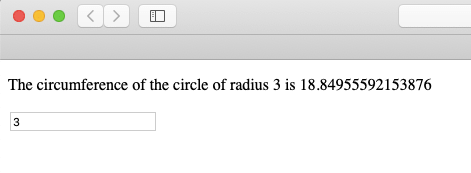
On entering some value to the input, the
setRadius() function updates the state
with it. This is how we use states in a functional component without
converting them to a class.
Now there is also another additional Hook called useReducer which also handles state.
The previous Hook useState is built over
useReducer. The difference is that,
updating a state via the
useReducer
involves dispatching an action to a reducer function which are mapped
to state transitions. This is very much akin to
Reducers
in Redux, which in turn is borowed from JavaScript's
Array.reduce()
method. Below we show its use with an example.
We first import useReducer.
import React, { useReducer } from 'react';
We create a functional component called
<Colour/> and call the
useReducer Hook inside it.
					import React, { useReducer } from 'react';

					const Colour = () => {
					  const [state, dispatch] = useReducer(reducer, '#ee82ee');
					  return (
					   	<div>
					   		...
					    </div>
					  )
					}

					export default Colour;
The reducer is a function which accepts
two arguments state and
action and returns the updated
state which is paired with the
dispatch method. The next argument is
#ee82ee, which is the initial state value.
Next we define the reducer for our
example.
					const reducer = (state, action) => {
					  switch (action) {
					    case 'red':
					      return '#ff0000';
					    case 'yellow':
					      return '#ffff00';
					    default:
					      throw new Error()
					  }
					}
The dispatch function dispatches a value for the action in the
reducer. Here is the full code of the
<Colour/> component with the
useReducer.
					import React, { useReducer } from 'react';

					const reducer = (state, action) => {
					  switch (action) {
					    case 'red':
					      return '#ff0000';
					    case 'yellow':
					      return '#ffff00';
					    default:
					      throw new Error()
					  }
					}

					const Colour = () => {
					  const [state, dispatch] = useReducer(reducer, '#ee82ee');
					  return (
					   	<div>
					      <span style={{color: state}}>♥</span>
					      <button onClick={() => dispatch('red')}>RED</button>
					      <button onClick={() => dispatch('yellow')}>YELLOW</button>
					    </div>
					  )
					}

					export default Colour;
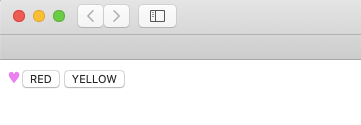
On click of either of the 'RED' or 'YELLOW' button, the dispatch function dispatches an action to the reducer, which in turn updates the state with a hex colour code.
Now let us operate on objects. We pick the two arguments passed to the
reducer - state and action - as objects. The state object has the
heart and
club properties while the action object
has the property type.
We redefine the reducer this way.
					const initialState = {
					  heart: '#ee82ee',
					  club: '#ee82ee',
					};

					const reducer = (state, action) => {
					  switch (action.type) {
					    case 'red':
					      return { ...state, heart: '#ff0000' };
					    case 'yellow':
					      return { ...state, heart: '#ffff00' };
					    case 'green':
					      return { ...state, club: '#00ff00' };
					    case 'blue':
					      return { ...state, club: '#0000ff' };
					    default:
					      return state;
					  }
					};
And the component <Colour/> using
the useReducer dispatching action objects
looks as follows.
					import React, { useReducer } from "react";

					const initialState = {
					  heart: '#ee82ee',
					  club: '#ee82ee',
					};

					const reducer = (state, action) => {
					  switch (action.type) {
					    case 'red':
					      return { ...state, heart: '#ff0000' };
					    case 'yellow':
					      return { ...state, heart: '#ffff00' };
					    case 'green':
					      return { ...state, club: '#00ff00' };
					    case 'blue':
					      return { ...state, club: '#0000ff' };
					    default:
					      return state;
					  }
					};


					const Colour = () => {
					  const [state, dispatch] = useReducer(reducer, initialState);
					  return (
					    <div>
					      <div>
					        <span style={{color: state.heart}}>♥</span>
					        <button onClick={() => dispatch({ type: 'red' })}>RED</button>
					        <button onClick={() => dispatch({ type: 'yellow' })}>YELLOW</button>
					      </div>
					      <div>
					        <span style={{color: state.club}}>♣</span>
					        <button onClick={() => dispatch({ type: 'green' })}>GREEN</button>
					        <button onClick={() => dispatch({ type: 'blue' })}>BLUE</button>
					      </div>
					    </div>
					  );
					};

					export default Colour;
Upon render, the component looks as follows.
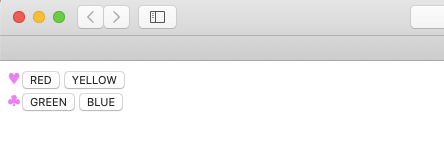
Both the ♥ and ♣ entities are coloured with the respective initial
state values passed as #ee82ee and
#ee82ee.
As reminded earlier, useState is built on
top of useReducer. But performance related
comparisons of the two are irrelevant. However, managing related
states are always better with
useReducer as it gives you more control.
To conclude, use useState when dealing
with simple unrelated states. Use
useReducer when you have to use complex
states and where one state rely on the value of another and you have
to update them according to actions.