React/ReactJS: Passing Props (w/ Methods) to a Functional Child Component
In
React's unidirectional flow of data,
props
are the easiest mode to pass data, state and methods from a parent
component to a child, and they are read-only.
In the example below, the parent component
<Deer/> passes a
props (an object) consisting of the
JSX attribute called
skinColour with the value
brown to its child component
<Fawn/>.
					// Parent Component
					class Deer extends React.Component {
					  render () {
					    return(
					      <Fawn skinColour={'brown'} />
					    )
					  }
					}
 A Doe & Fawn
by Marshal Hedin from San Diego.
CC BY-SA 2.0
A Doe & Fawn
by Marshal Hedin from San Diego.
CC BY-SA 2.0
Inside the child class component
<Fawn/>, the property
skinColour can be accessed via
this.props as follows:
					// Child Class Component
					class Fawn extends React.Component {
					  render () {
					    return(
					      <div style={{'color': this.props.skinColour}}>
					      	I AM THE SKIN COLOUR OF A FAWN
					      </div>
					    )
					  }
					}
By the way, if there are not going to be any states in a component as
in the above case (only render()), it is a
better approach to opt for a functional component instead of a class
component.
Passing Props to a Functional Child Component
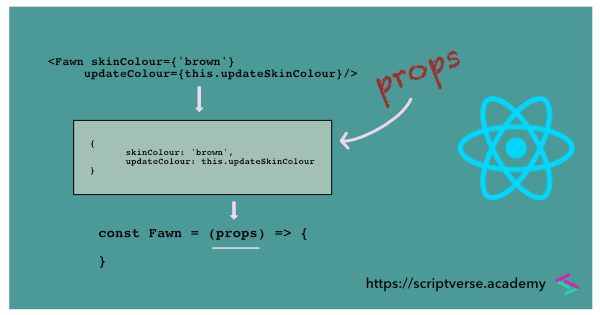
But unlike class components (which are ES6 classes), functional
components cannot have constructor() or
naturally inherit props from the parent
components. You have to pass props as an
argument (that is what it is originally) to the functional
component. And we do not use the
this keyword before
props. Also note the absence of the
render() method.
						// Child Functional Component
						const Fawn = (props) => {
						    return(
						      <div style={{'color': props.skinColour}}>
						      	I AM THE SKIN COLOR OF A FAWN
						      </div>
						    )
						}
Passing Method to a Functional Child Component
A method is also passed to a child component as any other JSX
attribute-value pair. And as in plain JavaScript, we do not attach
any parenthesis () while passing methods
as arguments. Below we define a method called
updateColour() in the parent component
<Deer/>. We pass it as the
attribute updateSkinColour, with its
value referencing the
updateColour() method with the
this keyword.
						// Parent Component
						class Deer extends React.Component {
						  updateColour() {
						  	console.log('the colour is biege');
						  }

						  render () {
						    return(
						      <Fawn skinColour={'brown'} updateSkinColour={this.updateColour} />
						    )
						  }
						}
Inside the child component
<Fawn/>, we access the passed
method as props.updateSkinColour. We use
it as a callback function to the click event of a
<button/> element.
						const Fawn = (props) => {
						    return(
						      <section>
							      <div style={{'color': props.skinColour}}>
							      	I AM THE SKIN COLOR OF FAWN
							      </div>
							      <button onClick={props.updateSkinColour}>
							      	Update Colour
							      </button>
						      </section>
						    )
						}
On click of it, the event gets triggered and the callback function prints the following message in the browser's console.
the colour is biege
We can implement it using the
state variable to update to another
colour dynamically on click, thereby replacing the initial
attribute-value pair
skinColour={'brown'} with
skinColour={this.state.skinColour}.
						// Parent Component
						class Deer extends React.Component {
						  constructor(props) {
						  	super(props);
						  	this.state = {
						  		skinColour: 'brown'
						  	}
						  	this.updateColour = this.updateColour.bind(this);
						  }

						  updateColour() {
						  	this.setState({
						  		skinColour: 'burlywood'
						  	});
						  }

						  render () {
						    return(
						      <Fawn skinColour={this.state.skinColour}
						      				updateSkinColour={this.updateColour} />
						    )
						  }
						}