React/ReactJS: Update an Array Element in Redux Reducer State
In our previous tutorial on
using Redux with React/ReactJS, we have appended a couple of objects into the Redux state variable
books as its elements, which is of type
array.
Now what if we have to change/update that state variable at a specific
index? How do we replace an array element at index
i?
The official React/ReactJS documentation suggests the use of
immutability helper
update()
to handle such data.
We make use of the package react-addons-update. Install it.
npm i react-addons-update
Import the installed
react-addons-update package into your
reducer.js. We introduce a new action type
called UPDATE_ARRAY to update a state
variable of type array (which is
books here) at the particular index
i. Here is how it is done. The index of
the element to be changed is set at
[action.id].
				// reducer.js
				import update from "react-addons-update";

				const INITIAL_STATE = {
					books: []
				}

				export default (state = INITIAL_STATE, action={}) => {
					switch(action.type) {
						case "UPDATE_ARRAY":
							return update(state, {
								books: {
									[action.id]: {
										$set: action.content
									}
								}
							});
						default:
							return state;
					}
				};
Inside action.js, we create one more
action creator called updateArray() just
to update that specific array element. Note carefully that this
updateArray() function has one extra field
id, which is the index of the array
element which is to be replaced. We create one wrapper function called
updateData() around
dispatch() which will be used in the React
component to send out an action to the store.
				// action.js
				const updateArray = (content) => {
					return {
						type: "UPDATE_ARRAY",
						id: content.id,
						content: content.element
					}
				}

				const updateData = (obj) => {
					return (dispatch) => {
						dispatch(updateArray(obj));
					}
				}

				export {
					updateData
				}
Now we get to the main component. In our
previous tutorial, inside
componentDidMount(), the first element
that was pushed to the books state
variable of type array in Redux store was
				{
					book_id: 1,
					title: 'Dune',
					author: 'Frank Herbert',
					year: 1965
				}
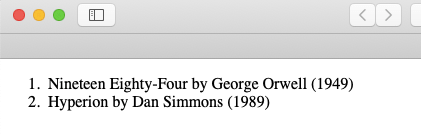
Here, we will replace it with a set of different values. We first pass
the updateData() function from
action.js as props to the component via
mapDispatchToProps. This is an element at index 0. This is
how you would do it.
				this.props.updateData({
					id: 0,
					element: {
						book_id: 1,
						title: 'Nineteen Eighty-Four',
						author: 'George Orwell',
						year: 1949
					}
				});
Now the old data which was at index 0 got
replaced by this new data
					{
						book_id: 1,
						title: 'Nineteen Eighty-Four',
						author: 'George Orwell',
						year: 1949
					}